It’s 9 p.m., and a potential customer is on your website with one quick question. There’s a contact form, but filling it out feels like a hassle. They close the tab and message your competitor instead.
That small moment is where conversions are won or lost. This guide compares live chat vs chatbot vs contact form in plain language, so you can pick the right way for visitors to reach you. It’s written for busy owners and teams who want clear answers, not jargon. If your website is already getting visitors but not enough inquiries, our guide to conversion-focused web design agencies in Texas explains why the user experience can make such a difference.
The Three Options in Plain English
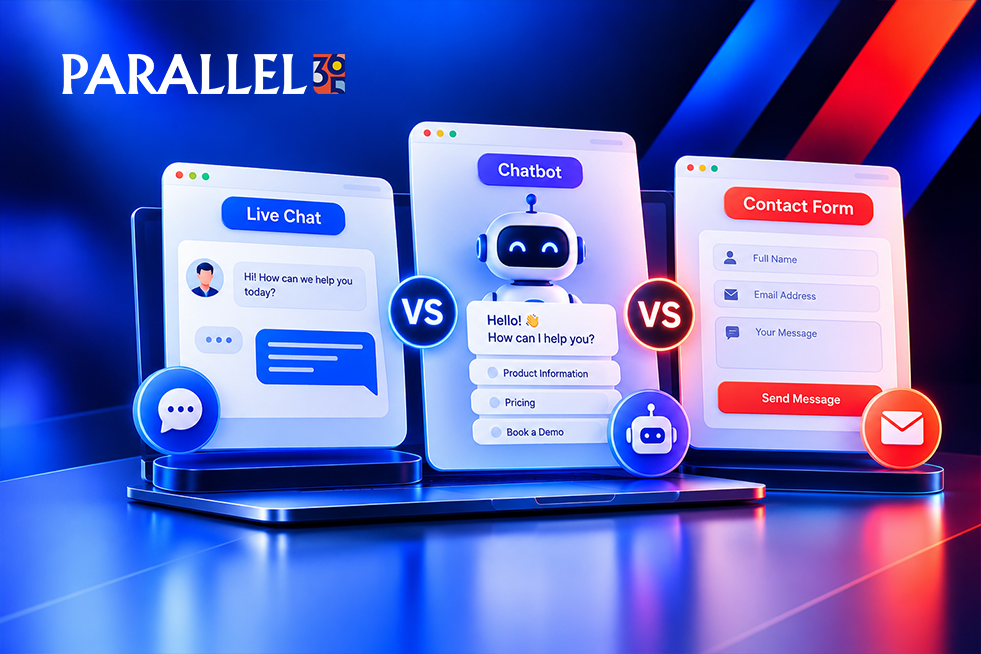
Contact form: visitors fill in their details and message, and you reply later, usually by email or phone.
Live chat: a real person from your team answers questions in real time through a chat window.
Chatbot: an automated assistant answers common questions and collects details, and can hand off to a person. Newer AI chatbots understand everyday language much better than older, scripted ones.
Live Chat vs Chatbot vs Contact Form at a Glance
| Factor | Contact Form | Live Chat | Chatbot |
|---|---|---|---|
| Response speed | Hours or longer | Instant, if staffed | Instant, any hour |
| Staff time | Low | High | Low after setup |
| Personal feel | Low | High | Medium |
| Best for | Detailed inquiries | Quick questions, high-value leads | FAQs and after-hours |
| Main risk | Visitors skip it | Unanswered chats | Wrong or unhelpful answers |
Contact Form: Simple and Reliable
A contact form is the baseline every site should have. It’s easy to set up, works around the clock, and gives you a written record of every inquiry.
Where it shines: detailed requests, quotes, and B2B inquiries where people want to explain their needs. Where it falls short: it’s slow. Visitors with a quick question often don’t bother, and a long form makes it worse.
Live Chat: Fast and Personal
Live chat lets visitors get answers without leaving the page. For service businesses and higher-priced purchases, that quick human touch can make the difference.
Does live chat increase conversions? It can, especially when visitors have questions before they buy and your team replies within a minute or two. It can also backfire. A chat window that nobody answers is worse than no chat at all. There’s no guarantee, so test it on your own site.
Watch out for: the staff time it needs. If you can’t cover business hours, live chat may not be realistic yet. For a deeper look at how user experience and conversion improvements work together, see UX and conversion optimization for B2B websites.
Chatbot: Always On
A chatbot answers common questions instantly, day or night, and can collect a name, email, or phone number for follow-up. An AI chatbot for a small business website can handle things like hours, services, pricing guidance, and booking links.
Where it shines: after-hours questions and repetitive FAQs, which frees your team to focus on real conversations. Where it falls short: it can frustrate visitors if it misunderstands them, and it needs setup and regular review so it doesn’t give wrong answers. Always offer a way to reach a human, and be clear that visitors are talking to a bot.
Which One Converts Best?
There’s no single winner. It depends on what your visitors need.
• Live chat vs contact form: chat usually wins for quick, high-intent questions. Forms win for detailed, considered requests.
• Chatbot vs contact form: a chatbot wins for after-hours and simple questions. A form wins when you need complete information up front.
• Live chat vs chatbot: live chat feels more personal, while a chatbot offers wider coverage with less staff time.
For most small businesses, the strongest setup is layered: a simple contact form that’s always there, plus chat or a chatbot on your highest-intent pages. Our article on 15 small business marketing mistakes also covers common website and lead-generation issues that can cause potential customers to leave.
How to Choose for Your Business
Start with four questions. How fast can you reply? What do visitors usually ask? When are they on your site? How much time can your team spare? Then match your answers to your situation:
• Startups: a clear contact form plus a simple chatbot for FAQs keeps costs and workload low. Explore our Startups / Early-Stage Business Solution for support as your business builds its marketing and lead-generation systems.
• Service businesses: live chat during business hours, a chatbot after hours, and a form as backup. Our Service-Based Businesses Solution is designed around generating qualified inquiries and building a consistent pipeline.
• Online stores: a chatbot for order and shipping questions, with live chat on product and cart pages.
• Mid-size businesses: a mix of all three, routed to the right team and tracked in your CRM.
Website Chat Widget Tips
However you add it, a few habits make a website chat widget work better:
Place it where it helps. Put it on service, pricing, and cart pages, not necessarily every page.
Write a friendly greeting. A short, specific opener beats “How can I help?”
Show your hours. Tell visitors when a person is available, and what happens outside those hours.
Offer a human handoff and a form backup. Nobody should hit a dead end.
Keep it fast and mobile-friendly. A heavy chat tool can slow your site down.
What to Look for in Live Chat Software
There’s no single best live chat software for small business. The right pick depends on your size and budget. Look for a tool that:
• Is simple enough for your team to use without training
• Works well on phones
• Connects to your email, CRM, and booking tools
• Lets you set hours, routing, and chatbot handoff
• Shows clear reports on chats and leads
Popular options include Tidio, LiveChat, Intercom, and HubSpot’s chat tools. Features and pricing change often, so check current plans before you commit.
Quick Diagnosis: Where Should You Start?
| What You’re Seeing | Start With |
|---|---|
| Visitors leave with unanswered questions | A chatbot or live chat on key pages |
| Few people complete your form | A shorter form, plus a chat option |
| Questions come in after hours | A chatbot with a form backup |
| Chats come in but your team can’t keep up | A chatbot to filter, or limit live chat hours |
Mistakes That Make It Worse
While adding chat, avoid a few common traps that hurt conversions:
Leaving chats unanswered. Slow replies tell visitors you don’t care.
Offering a chatbot with no human option. Visitors get stuck and leave.
Popping up instantly on every page. It interrupts people before they’ve had a chance to look around.
Removing the contact form. Some visitors prefer it, so keep it available.
Not tracking results. If you can’t tell which chats become leads, you can’t improve them.
How to Test What Converts Best
The best answer comes from your own data. Make one change at a time, such as adding chat to your service pages, and run it for about four weeks. Track form fills, chats, booked calls, and which ones turn into customers. Compare against your earlier results, keep what works, and try the next idea.
When to Work With a Conversion Partner
Many small teams can set up a form or chat on their own. It makes sense to bring in help when:
• Your site gets traffic but few inquiries
• You’re unsure which option fits your visitors
• You want chat, forms, and follow-up connected to your CRM
• You don’t have time to test, track, and improve
For help improving your website experience and conversion paths, explore Web, UX & Commerce Optimization. Whoever you hire, ask for reports that show leads and sales rather than just chats, make sure you own your tools and accounts, and avoid anyone who guarantees a conversion lift.
Frequently Asked Questions
Does live chat increase conversions?
It can, especially when visitors have questions before buying and your team replies quickly. Slow or missing replies can hurt, so test it on your site.
Is a chatbot better than live chat?
Neither is better in every case. A chatbot offers wider coverage with less staff time. Live chat is more personal and works well for high-value leads.
Should I replace my contact form with a chatbot?
Usually not. Keep the form as a reliable backup, and add chat or a chatbot where it helps.
Is an AI chatbot good for a small business website?
It can be, for FAQs and after-hours questions, if it’s set up carefully, reviewed regularly, and offers a human handoff.
Where should I put a website chat widget?
On high-intent pages like services, pricing, and cart. Avoid showing it instantly on every page.
How do I choose the best live chat software for a small business?
Choose a tool your team will actually use, that works on mobile, connects to your CRM, and has clear reporting.
Not sure which option will turn more of your visitors into leads? Parallel 365‘s Performance Growth & Lead Generation team builds conversion improvements as part of a connected growth system, so more of the people who visit your site turn into calls and customers. Schedule a strategy review to find out what’s holding your conversions back.